Skip to content

Language

Country

PrimaLuceLab ARCO 3" Robotic rotator

SKU PLL-PLLARCO3
Original price $1,295.00 USD - Original price $1,295.00 USD
Original price
$1,295.00 USD
$1,295.00 USD - $1,295.00 USD
Current price $1,295.00 USD
Price Match Policy!
  • Robotic camera rotator and field de-rotator
  • 1 arcsecond per step rotational resolution
  • 76.3 mm free aperture
  • 23 mm body thickness
  • 7 kg payload capacity
  • Integrates directly with ESATTO or SESTO SENSO 2/3 units
Backordered
Availability Info
FREE Shipping in CONUS
  • Description
  • FAQ
  • Specifications
  • In the Box
  • Downloads
  • Warranty
  • PrimaLuceLab ARCO 3" Robotic Rotator

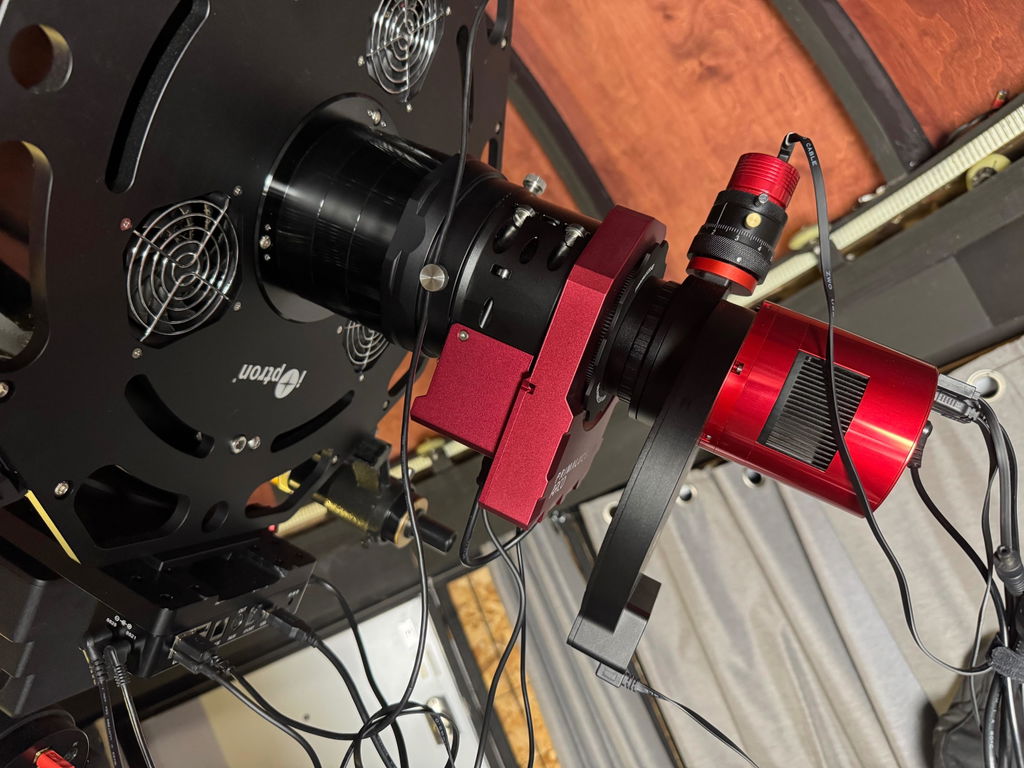
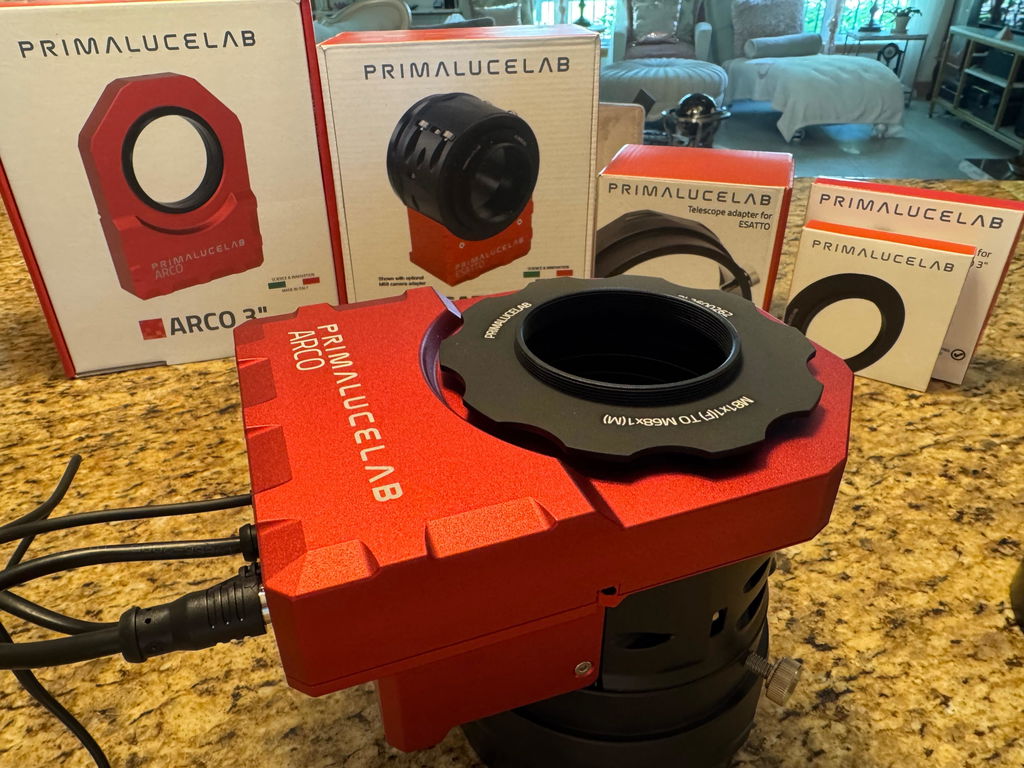
    The PrimaLuceLab ARCO 3" is the larger version of the ARCO camera rotator and field de-rotator: 23 mm thick, with a 76.3 mm free aperture, a 7 kg payload capacity and a resolution of 1 arc second per step. The camera side has an M81x1 male thread, and it weighs 1060 g. It is powered and controlled through a single short cable from a PrimaLuceLab ESATTO focuser or SESTO SENSO 2/3 motor, so it needs no USB or 12V cable of its own.

    Robotic Rotation and Field De-Rotation

    The ARCO 3" has two uses. On an equatorially mounted telescope, it rotates the camera without you touching the telescope.

    On an alt-azimuth mount, without a wedge, it also works as a field de-rotator with PLAY software, so you can take long exposures. The manual lists the alt-az mounts tested so far: SkyWatcher AZ-EQ6 and AZ-EQ5 with a USB port on the mount head, and Panther TTS-160.

    1 Arc Second Per Step

    The ARCO 3" moves in steps of 1 arc second, so you can set the camera angle in very fine increments, with a slider or a typed angle in PLAY or the Virtual HandPad, or from ASCOM software.

    76.3mm Aperture and 7 kg Capacity in a 23mm Profile

    The ARCO 3" carries up to 7 kg. Its full aluminum case can rotate heavy cameras and accessories without flexure. All mechanical and electrical parts sit inside the case, so nothing protrudes to touch the camera, accessories or telescope.

    The body is 23 mm thick (24.5 mm with the ESATTO 3" adapter PL3600458), with a 76.3 mm free aperture.

    Unified Power and Data with ESATTO & SESTO SENSO

    ARCO is not a standalone unit: it must be connected to an ESATTO robotic focuser or a SESTO SENSO 2/3 focusing motor, which power and control it through one rotator port cable (220mm and 690mm cables are included). The manual requires firmware 3.0 or later on the ESATTO or SESTO SENSO 2; update it with PLAY.

    ARCO draws its power from the 12V supply connected to your ESATTO or SESTO SENSO.

    Telescope & Camera Connections: M81 Threads and an Ecosystem of Adapters

    The ARCO 3" connects through optional adapters. On the camera side, it has the same M81x1 male thread as the camera side of the ESATTO 3" draw tube, so it takes the M81 adapters with stop ring.

    • Telescope Side: PL3600458 for ESATTO 3" and PL3600459 for ESATTO 4". On focusers with a SESTO SENSO 2/3: PL3600465 for a 63x1 female thread (2mm optical thickness) or PL3600463 for an 86x1 female thread.
    • Camera Side: T2 (PL3600282), M48 (PL3600277), M54 (PL3600275), M57 (PL3600279), M68 (PL3600262), M68 male (PL3600289), M72 (PL3600272), M72 male (PL3600252), and the PL8410002 2" visual back for a 2" nosepiece.

    Software Control: PLAY, ASCOM, and WiFi Virtual HandPad

    The ARCO 3" is controlled through your ESATTO or SESTO SENSO. PLAY software (Windows 10 or 11, or an EAGLE, where it adds more advanced features) controls focuser, rotator and the mount through its ASCOM driver. For third-party software, the PLL ASCOM Focuser driver (version 3.0 or later, ASCOM platform 6.4 or later) adds a PLL ASCOM Rotator; the manual's example is Sequence Generator Pro, and any software that supports ASCOM rotators can be used.

    For computer-free operation, the ARCO 3" can be controlled via the WiFi network generated by the ESATTO or SESTO SENSO. Connect a smartphone or tablet, open 192.168.4.1 in the browser and use the Virtual HandPad to enable ARCO, calibrate it, rotate the camera and set a new zero position. Field de-rotation is not available from the Virtual HandPad.

    Calibration and Homing: Establishing a Repeatable Zero Point

    The ARCO 3" must be calibrated, from PLAY (Rotator section, ENABLE ROTATOR, then CALIBRATION) or from the Virtual HandPad, where it may take several minutes. ARCO makes a rotation, so first check that the camera and accessories after it can turn a full 360° and arrange or disconnect their cables. Calibration is saved in the firmware. Repeat it every time you enable or disable ARCO and whenever you mechanically rotate ARCO relative to the focuser; once enabled and calibrated, you can leave it enabled.

    The Set ZERO position button makes the current position 0. In ASCOM software, the Manual Sync button assigns an angle to the current position.

    Power and Installation: Single-Cable Setup and System Requirements

    On an ESATTO, thread the optional adapter onto the draw tube, fit ARCO onto it and tighten the three grub screws with the included 2mm Allen key. With a SESTO SENSO, lock the adapter into ARCO first, then fit ARCO to the focuser. Do not over-tighten the grub screws, or you may ruin the thread or the inner adapter. Use the 220mm cable with an ESATTO and the 690mm cable with a SESTO SENSO, and check with the draw tube fully out that the cable lets it move freely. Line up the connector pins and press gently; never force the connector.

    Power the ESATTO or SESTO SENSO with a 12V supply of at least 1A (5.5/2.5mm plug, center positive): a computer's USB alone may not provide enough power for both devices. If ARCO does not move or clicks with 12V connected, the manual has you adjust the worm gear screw while the motor runs, with small turns in both directions until it moves. Do not disassemble ARCO, expose it to rain or use it below -20°C or above +60°C.

    Field Operation: Using the ARCO with Equatorial and Alt-Azimuth Mounts

    With an equatorial mount, connect the focuser and the polar-aligned mount in PLAY, enable and calibrate ARCO, then use the slider or a typed angle and GO in the CAPTURE section. ASCOM software can command an angle in the same way.

    With a supported alt-azimuth mount, connect it in PLAY (the AZ-EQ6 and AZ-EQ5 set mechanically in alt-az mode, pointed North at the horizon, counterweight bar West). When the mount reaches the target and starts tracking, PLAY starts field de-rotation automatically and the status shows ACTIVE. A commanded camera rotation pauses de-rotation until it completes.

  • Does the PrimaLuceLab ARCO 3" rotator need its own power cable?

    No. The ARCO 3" is designed to receive both power and data through a single cable connected to a PrimaLuceLab ESATTO focuser or SESTO SENSO 2/3 focusing motor. Power the ESATTO or SESTO SENSO with 12V (at least 1A).

    Can I use the ARCO 3" rotator by itself, connected directly to my computer?

    No, the ARCO 3" is not a standalone device. It requires a connection to an ESATTO robotic focuser or a SESTO SENSO 2/3 focusing motor to operate.

    How does the ARCO 3" allow long exposures with my alt-azimuth telescope?

    When used with a supported alt-azimuth mount and the PLAY software, the ARCO 3" functions as a field de-rotator. When the mount starts tracking a target, PLAY starts de-rotation automatically. Tested mounts: SkyWatcher AZ-EQ6 and AZ-EQ5 with a USB port on the mount head, and Panther TTS-160.

    What do I need to connect the ARCO 3" to my ESATTO 3" focuser?

    To connect the ARCO 3" to an ESATTO 3" focuser, you need the optional PL3600458 adapter. With it, the rotator is 24.5mm thick. Link the two with the short 220mm rotator port cable.

    Which ESATTO 4" adapter do I need?

    The optional PL3600459 adapter connects the ARCO 3" to the ESATTO 4".

    How do I control the PrimaLuceLab ARCO 3" rotator?

    You can control the ARCO 3" through several methods, all managed via its host ESATTO or SESTO SENSO unit:

    • PLAY Software: On an EAGLE or a Windows 10/11 computer.
    • ASCOM Driver: The PLL ASCOM Rotator, for software that supports ASCOM rotators, such as Sequence Generator Pro.
    • Virtual HandPad: Via the focuser's WiFi from a smartphone or tablet browser, for camera rotation without a computer.

    What is the payload capacity of the ARCO 3"?

    The ARCO 3" has a payload capacity of 7 kg. Its full aluminum case can rotate heavy cameras and accessories without flexure.

    What is the free aperture of the ARCO 3"?

    The ARCO 3" has a 76.3 mm free aperture, the same as the ESATTO 3" focuser.

    Do I need to calibrate the ARCO 3" every time I use it?

    No. Calibration is saved in the firmware. Repeat it whenever you enable or disable ARCO, or mechanically rotate it relative to the focuser; once enabled and calibrated, you can leave it enabled.

    Can I use the ARCO 3" as a field de-rotator without a computer, using only the WiFi Virtual HandPad?

    No. Field de-rotation works only with PLAY, on a Windows computer or EAGLE connected to a supported alt-az mount. The Virtual HandPad does camera rotation only.

  • Telescope-side connection ESATTO or SESTO SENSO 2/3 adapter (optional)
    Kind Rotator
    Optical length 23 mm
    Camera-side connection M81x1 Male
    Motorized Yes
    Clear aperture 76.3 mm
    Load capacity 7 kg
    Step / angle resolution 1 arc second per step
    Weight 1060 g
    • ARCO camera rotator and field de-rotator

      × 1

    • 2mm Allen key

      × 1

    • Rotator port cable 220mm

      × 1

    • Rotator port cable 690mm

      × 1

    • ARCO quick start guide

      × 1

  • PrimaLuceLab 1-Year Warranty