Skip to content

Language

Country

OCAL 4.0 Electronic Collimator

by OCAL
SKU OCAL-4
Original price CA$345.00 - Original price CA$345.00
Original price
CA$345.00
CA$345.00 - CA$345.00
Current price CA$345.00
Price Match Policy!
  • Camera-based electronic collimator for reflecting telescopes
  • 0.08 mm theoretical collimation accuracy
  • Native M42 thread connection
  • Includes M42-to-1.25" and M42-to-M48 adapters
  • Software for Windows (7+), macOS, and Android devices
  • Powered by 5V over a USB-C connection
6 in stock
Qualifies for FREE Shipping in Canada on orders over $500.
  • Description
  • FAQ
  • Specifications
  • In the Box
  • Downloads
  • Warranty
  • OCAL 4.0 Electronic Collimator

    The OCAL 4.0 Electronic Collimator replaces subjective visual alignment with a camera-based system, achieving a theoretical collimation accuracy of 0.08 mm for Newtonian, SCT, and RC telescopes. It connects natively via an M42 thread and includes both M42-to-M48 and M42-to-1.25" adapters for broad compatibility out of the box. Powered by a 5V USB connection, the collimator displays a live video feed on Windows 7 (and later), macOS, or Android devices, with no special drivers required.

    A Camera-Based System with 0.08 mm Theoretical Accuracy

    The OCAL 4.0 works by displaying a live video feed of your telescope's optical components on your computer or tablet screen. This removes the errors that differences between people's eyes cause with traditional collimation tools, and you see the secondary and primary mirrors line up in real time. The system's core principle is to align the centers of all optical elements, achieving a theoretical precision of 0.08 mm for a perfectly concentric optical train.

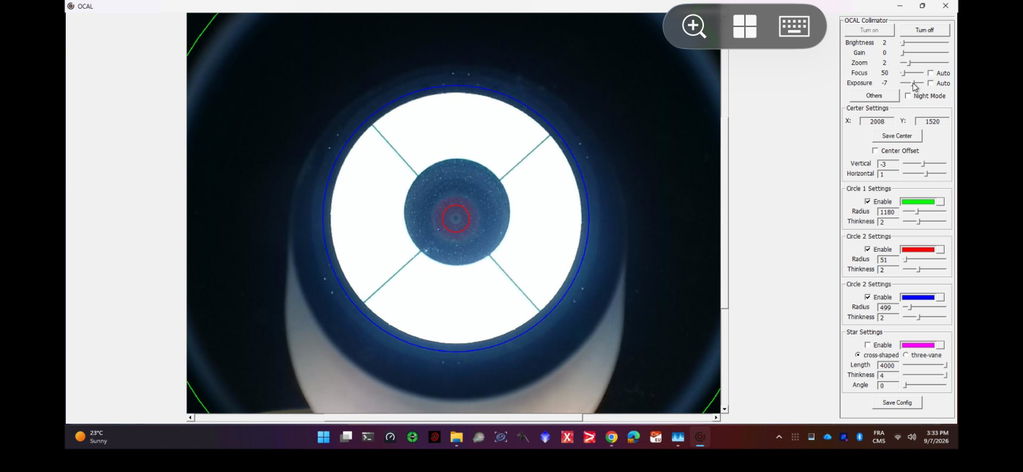
    While the final result depends on your telescope's mechanical tolerances, this method provides a direct, data-driven view of your alignment. The software overlays colored circles and crosshairs, turning the abstract task of collimation into a simple process of centering circles and aligning lines on a screen.

    M42 Thread with 1.25" and M48 Adapters

    The OCAL 4.0 is designed to be installed at the same focal plane as your imaging camera sensor for the most accurate results. It features a female M42 thread for direct mounting to focusers or coma correctors with a matching male thread. To ensure compatibility with a wide range of equipment, OCAL includes two essential adapters.

    • M42-to-1.25" Adapter: Allows you to insert the collimator into any standard 1.25" focuser or visual back, treating it like a typical eyepiece.
    • M42-to-M48 Adapter Ring: For equipment with an M48 thread.

    4:3 Display Ratio Software for Windows, macOS, and Android

    OCAL provides dedicated software for Windows (7 and newer), macOS (via the Mac App Store), and Android devices, connecting via a standard USB-A to USB-C cable. An OTG adapter is included for connecting to phones and tablets. The 4.0 model uses an improved CMOS sensor with a 4:3 aspect ratio, which more efficiently displays the circular mirrors and internal structures of the telescope compared to widescreen 16:9 formats.

    Each OCAL 4.0 has a unique factory center calibration code tied to its serial number, which you enter into the software once. Save it in the software. An offset of 4 to 8 pixels is normal and can be corrected with the Center Offset function. The software's live view shows alignment shifts instantly as you make adjustments to your telescope's collimation screws.

    The 4-Step Newtonian Collimation Method

    For Newtonian reflectors, the OCAL software enables a straightforward, repeatable 4-step collimation process. Collimation can be done in daylight by pointing the scope at the sky or at night using a flat, even light source such as a computer screen or a brightly lit wall.

    1. Secondary Mirror Positioning: Size the red circle to the primary and the green circle to the secondary's edge, rotate the secondary roughly toward you, correct its elevation with screw A, then align its left and right edges with the green circle using screws B and C.
    2. Separate Secondary and Primary Positioning: Rotate the secondary slightly so the red circle sits evenly on the primary left and right, then use screw A to close the vertical gap.
    3. Secondary Mirror Height: By observing the green circle's fit against the edge of the secondary mirror, you adjust the central screw to raise or lower the mirror until it is perfectly framed.
    4. Primary Mirror Adjustment: Finally, you adjust the primary mirror's collimation screws until the crosshair aligns with the spider vanes, the blue circle is concentric with the collimator's reflection, and the primary center mark falls inside the black circle on the 4.0.

    OCAL 4.0 vs. OCAL 3.0 MAX: Key Upgrades

    The 4.0 is an upgrade over the 3.0 MAX in image quality and stability. The 3.0 MAX retains a slight advantage with a larger lens aperture, but the 4.0 introduces several key improvements for practical use.

    • Image Quality and Clarity: The OCAL 4.0 uses a higher-pixel CMOS sensor, which shows clearer primary mirror markers and richer reflection details.
    • Optimized Display: It moves to a 4:3 screen ratio, providing a more efficient view of the telescope's circular optical components compared to the 16:9 ratio on previous models.
    • Improved Stability: With a smaller and lighter body, the 4.0 is not afraid of slight bumps and shakes in daily use and keeps its calibration accuracy.
  • How do I use the OCAL 4.0 with my fast Newtonian that has a coma corrector?

    Install the collimator at the camera's focal plane position; it can be mounted on a coma corrector. For fast Newtonians that reach focus through a reducer or corrector (such as H-2, Takahashi and SharpStar Newtonians), the extension needed to work at the native focal length is impractical, so use a simplified method: use the markings on the secondary mirror as the reference and adjust until concentric.

    What's the best way to light my telescope for collimation with the OCAL 4.0 at night?

    If you are collimating at night, you need a smooth, even light source for the telescope to point at. A computer monitor or a large tablet screen set to a white background works very well. You can also point the telescope at a brightly lit, neutral-colored wall. The goal is to provide diffuse, even illumination down the optical tube.

    What is the factory center calibration code for the OCAL 4.0 and why is it important?

    Each OCAL 4.0 unit is factory-calibrated to determine the exact pixel center of its camera sensor. This data is provided as a unique X/Y coordinate code linked to your collimator's serial number. Enter the X and Y values in the software and save them; otherwise the settings reset to default at the next start. Without this code, the software overlays will not represent the true optical axis.

    Does the OCAL 4.0 work with Schmidt-Cassegrain (SCT) or Ritchey-Chrétien (RC) telescopes?

    Yes. It works with Newtonian, SCT, RC and other reflecting telescopes, but the step-by-step tutorial covers Newtonians only.

    What software and operating systems are compatible with the OCAL 4.0?

    The OCAL 4.0 is compatible with three major operating systems. You can download the software for Windows (Windows 7 and later) and find the macOS version on the Mac App Store. For mobile use, an Android app is available. There is no app for iOS (iPhone/iPad).

    Do I need to put a white paper behind my secondary mirror with the OCAL 4.0?

    No. Paper behind the secondary makes its edge easier to see, but the OCAL 4.0 features an improved camera sensor that provides a clear view of the secondary mirror's edge without needing a white paper background.

  • Type Camera-based electronic collimator
    For Newtonian, Schmidt-Cassegrain, Ritchey-Chrétien and other reflecting telescopes
    Theoretical Collimation Accuracy 0.08 mm (actual result depends on the telescope's machining and assembly)
    Telescope Connection M42 thread (screws onto an M42 male thread)
    Included Adapters M42-to-M48 adapter ring, M42-to-1.25" adapter tube
    Connection USB-A to USB-C data cable, OTG adapter for phones and tablets
    Power 5V over USB
    Computer Drivers None required
    Software Windows (Windows 7 and later), Android, macOS (Mac App Store)
    Overlays Red, green and blue alignment circles, crosshair, spider vane guide
    Calibration Unique factory center calibration code for each unit
    Certifications FCC, CE
    • OCAL 4.0 collimator main unit

      × 1

    • M42-to-M48 adapter ring

      × 1

    • M42-to-1.25" adapter tube

      × 1

    • OTG adapter

      × 1

    • USB-A to USB-C data cable

      × 1

  • OCAL Warranty