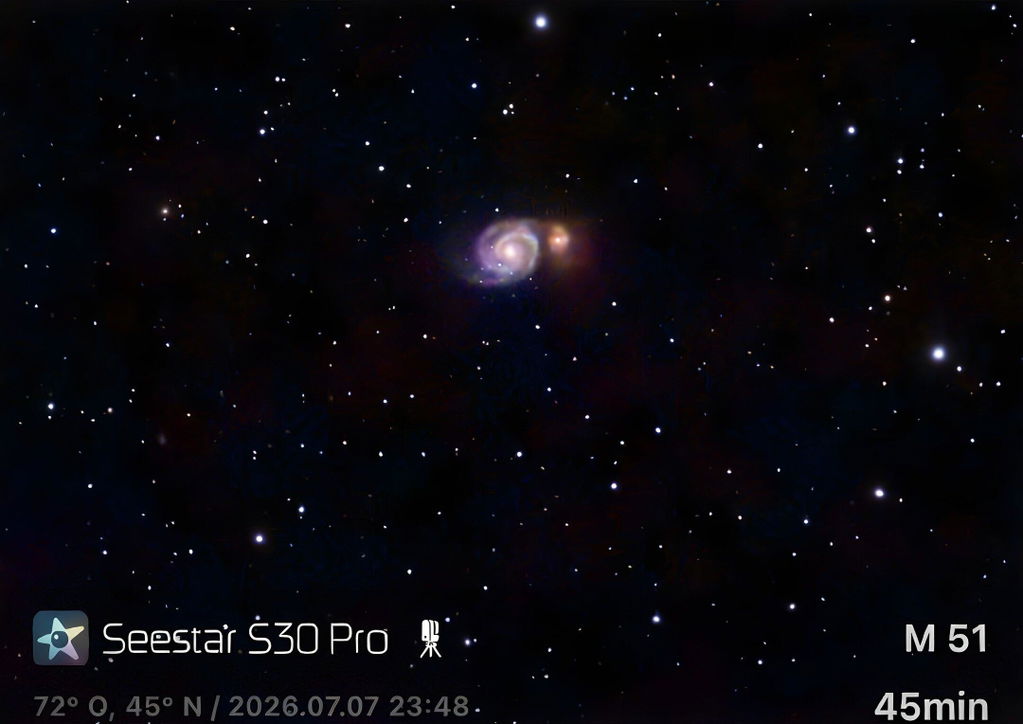
What can I realistically see and image with the Seestar S30 Pro from a light-polluted city?
Even from a city, the Seestar S30 Pro can capture impressive images. The built-in light pollution filter is key, as it isolates the specific Hα (20nm) and OIII (30nm) wavelengths emitted by many nebulae. This allows you to capture targets like the Orion Nebula (M42) and the Lagoon Nebula (M8) with surprising contrast. Bright objects like the Moon, Jupiter, and Saturn are also excellent urban targets.
How does the Seestar S30 Pro handle imaging a large target like the Andromeda Galaxy (M31)?
The Seestar S30 Pro's telephoto camera has a 4.6° field of view, which is wide enough to frame many large deep-sky objects, including most of the Andromeda Galaxy (M31). To go wider, DSO mosaic stitching shoots a planned mosaic grid and automatically stitches the images into a single image of up to 8K.
Do I need any astronomy experience to use the Seestar S30 Pro?
No, absolutely not. The Seestar S30 Pro is designed for everyone, from complete beginners to experienced observers. The entire process, from setup to capturing images, is automated through the smartphone app. You don't need to know how to align a telescope, identify stars, or process images; the Seestar handles all of that for you.
What is the difference between the Seestar S30 Pro's telephoto and wide-angle cameras?
The Seestar S30 Pro has two distinct camera systems for different purposes:
- The telephoto camera uses a Sony IMX585 sensor with a 160mm focal length lens. This is the primary imaging camera, used to capture detailed, magnified views of distant objects like planets, nebulae, and galaxies.
- The wide-angle camera uses a Sony IMX586 sensor and provides a massive 63° field of view. It's used for capturing wide-field images like the Milky Way or star trails.
How long does the Seestar S30 Pro's battery last, and how is it charged?
The internal 6000mAh battery provides approximately 6 hours of imaging time in stargazing mode (ZWO laboratory test data). It recharges using the included Type-C cable and any standard USB power adapter that can supply DC 5V at 3A.
Can I use the Seestar S30 Pro during the day?
Yes. The Seestar S30 Pro is also a powerful daytime telephoto camera. You can use it for long-distance landscape photography, birdwatching, or rocket launches. A solar filter must be installed when observing the Sun; never allow the main camera to observe the Sun directly, as this may cause permanent damage to the device.
What do the built-in filters on the S30 Pro do?
The S30 Pro has an internal filter wheel with three filters: a UV/IR Cut filter for correct color balance, a Dark Field filter for noise calibration, and a dual-band Light Pollution filter. The light pollution filter is particularly useful for imaging emission nebulae from urban or suburban skies, as it reduces the effects of urban glow and moonlight.
How does Equatorial Mode on the Seestar S30 Pro improve my images?
While the standard Alt-Azimuth mode is very easy to use, images taken over long periods can suffer from "field rotation" at the edges. Equatorial (EQ) mode corrects for this by aligning the telescope's rotation axis with the Earth's. This keeps stars sharp and allows longer exposures. EQ mode requires additional accessories; the Seestar TH10 Fluid Tripod Head with the TC20 Carbon Fiber Tripod is recommended for the S30 Pro.
Can I connect the Seestar S30 Pro to my computer and use software like N.I.N.A.?
Yes. The Seestar S30 Pro supports the ASCOM Alpaca protocol, which allows it to communicate with a wide range of third-party astronomy software over a network connection. This lets advanced users integrate the Seestar into sophisticated imaging workflows controlled by programs like N.I.N.A. for automated and customized sessions.
How portable is the Seestar S30 Pro for travel?
Extremely portable. The main unit weighs only 1650 g (1.65 kg), and the entire package, including the included tripod and carrying case, is compact and lightweight. It easily fits into a backpack, making it an ideal companion for hiking, camping, or air travel to dark-sky locations.
How much data can the 128GB internal storage hold?
The 128GB of eMMC storage provides ample space for multiple imaging sessions. A single processed JPEG image is relatively small, while a stacked FITS file containing raw data will be larger. Part of the capacity is used by the system, so the space available to you is somewhat less than 128GB.
Which is better for me, the Seestar S30 Pro or the S50 Pro?
The choice depends on your main goal. The 1.65 kg S30 Pro is a portable all-rounder for a wide range of shooting scenarios, and the S50 Pro (2.8 kg main unit) is built for deep-sky imaging, with a larger 50mm aperture, a more capable tracking system and richer image detail.